WebSocket 是一种在单个TCP 连接上进行全双工 通信的协议。WebSocket使得客户端和服务器之间的数据交换变得更加简单,允许服务端主动向客户端推送数据。在WebSocket API中,浏览器和服务器只需要完成一次握手,两者之间就直接可以创建持久性的连接,并进行双向数据传输。
参考原文:
websocket 实现后端主动前端推送数据、及时通讯(vue3 + springboot)
Vue3和SpringBoot实现Web实时消息推送
即时通讯,服务端主动推送数据 后端主动推送数据给前端的核心实现方案包括WebSocket、Server-Sent Events(SSE)、长轮询(Long Polling)和HTTP/2 Server Push。这些方案适用于不同场景,选择需综合考虑实时性要求、兼容性和实现复杂度。
主流实现方案对比
方案
协议基础
通信模式
延迟
实现复杂度
适用场景
WebSocket
独立TCP协议
全双工双向通信
低
较高
实时聊天、高频数据监控(如股票)
Server-Sent Events
HTTP
单向服务器推送
中等
较低
新闻推送、日志实时更新
长轮询
HTTP
半双工轮询
较高
低
兼容老旧浏览器、低频率更新场景
核心方案技术解析 WebSocket
实现原理: 通过一次HTTP握手建立持久化TCP连接,支持服务端与客户端双向通信代码示例: Spring Boot中可通过@ServerEndpoint注解快速搭建服务端,前端通过WebSocket对象建立连接优势: 低延迟、高吞吐量,适合实时交互场景局限性: 需处理连接状态维护,不支持HTTP/1.0以下协议
Server-Sent Events (SSE)
实现原理: 基于HTTP长连接的单向推送,客户端通过EventSource监听事件流代码示例: Java中使用SseEmitter发送事件流,前端通过addEventListener接收数据优势: 天然支持断线重连,兼容现有HTTP基础设施局限性: 仅支持文本数据传输,无法实现客户端主动请求
长轮询优化策略
实现原理: 客户端发起请求后,服务端阻塞直到数据更新或超时,减少无效请求代码示例: Node.js通过维护回调队列实现延迟响应,前端循环调用接口优势: 兼容性最佳,适用于简单场景局限性: 高并发时服务器资源消耗较大
选型建议
强实时性场景 (如在线游戏、IM):优先选择WebSocket单向数据同步场景 (如价格更新、通知推送):SSE更轻量高效兼容性优先场景 :长轮询或结合HTTP/2 Server Push(需注意浏览器支持度)
WebSocket WebSocket 是一种全双工通信协议,用于在 Web 浏览器和服务器之间建立持久的连接。WebSocket 协议由 IETF 定为标准,WebSocket API 由 W3C 定为标准。一旦 Web 客户端与服务器建立连接,之后的全部数据通信都通过这个连接进行。可以互相发送 JSON、XML、HTML 或图片等任意格式的数据 。
WebSocket 与 HTTP 协议的异同 相同点
都是基于 TCP 的应用层协议 。
都使用 Request/Response 模型进行连接的建立。
可以在网络中传输数据。
不同点
WebSocket 使用 HTTP 来建立连接,但定义了一系列新的 header 域,这些域在 HTTP 中并不会使用。
WebSocket 支持持久连接 ,而 HTTP 协议不支持持久连接。
WebSocket 的优缺点 优点
高效性: 允许在一条 WebSocket 连接上同时并发多个请求,避免了 传统 HTTP 请求的多个 TCP 连接 。WebSocket 的长连接特性提高了效率,避免了 TCP 慢启动和连接握手的开销 。节省带宽: HTTP 协议的头部较大,且请求中的大部分头部内容是重复的。WebSocket 复用长连接 ,避免了这一问题。服务器推送: WebSocket 具备跨域通信 的能力,可以跨域进行实时通信,提供了低延迟的实时通信能力 ,能够在服务器端有新数据时立即推送给客户端。支持客户端和服务器之间的双向通信 ,可以实现实时聊天、实时数据更新等场景
缺点
长期维护成本: 服务器需要维护长连接,成本较高。浏览器兼容性: 不同浏览器对 WebSocket 的支持程度不一致。受网络限制: WebSocket 是长连接,受网络限制较大,需要处理好重连。
WebSocket 应用场景 实时通信领域(实时聊天应用、视频会议/聊天、社交聊天弹幕)、股票行情推送、体育实况更新、实时协作编辑、多人游戏、实时数据监控、智能家居、基于位置的应用、在线教育等需要实时双向通信的场景 。
WebSocket 的连接建立过程
客户端发送 WebSocket 握手请求
服务器收到握手请求后,验证请求头的字段,并返回握手响应
客户端收到握手响应后,验证响应头的字段,并生成一个 Sec-WebSocket-Accept 值进行验证
验证通过后,WebSocket 连接建立成功,客户端和服务器可以开始进行实时通信
如何处理错误和关闭连接 WebSocket 在出现错误时会触发 error 事件 ,可以通过设置 onerror 事件处理函数来处理错误。 例如:
1 2 3 socket.onerror = function (error ) { console .error ('WebSocket 错误:' , error); };
当 WebSocket 连接关闭时,会触发 close 事件 ,可以通过设置 onclose 事件处理函数 来执行一些清理操作或重新连接等操作,可以通过调用 close() 方法来显式地关闭 WebSocket 连接
实际应用中,如何处理连接状态的变化和重连机制 在 onopen 事件中,使用 setInterval 方法定时发送心跳数据包。如每 5000 毫秒发送一次心跳数据包 ,如下所示代码:
1 2 3 4 5 ws.onopen = function ( heartcheck = setInterval (function ( ws.send ('HeartBeat' ); },5000 ); };
在onmessage事件中,当接收到服务器返回的心跳响应或其他消息时,可以重置心跳定时器 ,以避免不必要的心跳发送。例如:
1 2 3 4 5 6 ws.onmessage = function ( clearInterval (heartcheck); heartcheck=setInterval (function ( ws.send ('HeartBeat' ); }, 5000 ); };
在onclose和onerror事件中,需要清除心跳定时器 ,以避免在连接关闭后继续发送心跳数据包。例如:
1 2 3 4 5 6 7 ws.onclose = function ( clearInterval (heartcheck); }; ws.onerror = function ( clearInterval (heartcheck); }
WebSocket实时通信(vue3 + springboot) 后端代码(SpringBoot) 安装核心jar包: spring-boot-starter-websocket 1 2 3 4 5 6 7 8 9 10 11 12 13 14 15 16 17 <dependencies > <dependency > <groupId > org.springframework.boot</groupId > <artifactId > spring-boot-starter-websocket</artifactId > </dependency > <dependency > <groupId > cn.hutool</groupId > <artifactId > hutool-all</artifactId > <version > 5.1.0</version > </dependency > <dependency > <groupId > com.alibaba</groupId > <artifactId > fastjson</artifactId > <version > 2.0.22</version > </dependency > </dependencies >
新建配置类注入 1 2 3 4 5 6 7 8 9 10 11 import org.springframework.context.annotation.Bean;import org.springframework.context.annotation.Configuration;import org.springframework.web.socket.server.standard.ServerEndpointExporter;@Configuration public class WebSocketConfig2 { @Bean public ServerEndpointExporter serverEndpointExporter () { return new ServerEndpointExporter (); } }
写一个基础webSocket服务 1 2 3 4 5 6 7 8 9 10 11 12 13 14 15 16 17 18 19 20 21 22 23 24 25 26 27 28 29 30 31 32 33 34 35 36 37 38 39 40 41 42 43 44 45 46 47 48 49 50 51 52 53 54 55 56 57 58 59 60 61 62 63 64 65 66 67 68 69 70 71 72 73 74 75 76 77 78 79 80 81 82 83 84 85 86 87 88 89 90 91 92 93 94 95 96 97 98 99 100 101 102 103 104 105 106 107 108 109 110 111 112 113 114 115 116 import javax.websocket.*;import javax.websocket.server.PathParam;import javax.websocket.server.ServerEndpoint;import java.io.IOException;import java.util.concurrent.ConcurrentHashMap;@ServerEndpoint("/dev-api/websocket/{userId}") @Component public class WebSocketServer { static Log log = LogFactory.get(WebSocketServer.class); private static int onlineCount = 0 ; private static ConcurrentHashMap<String, WebSocketServer> webSocketMap = new ConcurrentHashMap <>(); private Session session; private String userId = "" ; @OnOpen public void onOpen (Session session, @PathParam("userId") String userId) { this .session = session; this .userId = userId; if (webSocketMap.containsKey(userId)) { webSocketMap.remove(userId); webSocketMap.put(userId, this ); } else { webSocketMap.put(userId, this ); addOnlineCount(); } log.info("用户连接:" + userId + ",当前在线人数为:" + getOnlineCount()); try { sendMessage("连接成功" ); } catch (IOException e) { log.error("用户:" + userId + ",网络异常!!!!!!" ); } } @OnClose public void onClose () { if (webSocketMap.containsKey(userId)) { webSocketMap.remove(userId); subOnlineCount(); } log.info("用户退出:" + userId + ",当前在线人数为:" + getOnlineCount()); } @OnMessage public void onMessage (String message, Session session) { log.info("用户消息:" + userId + ",报文:" + message); if (! StringUtils.isEmpty(message)) { try { JSONObject jsonObject = JSON.parseObject(message); } catch (Exception e) { e.printStackTrace(); } } } @OnError public void onError (Session session, Throwable error) { log.error("用户错误:" + this .userId + ",原因:" + error.getMessage()); error.printStackTrace(); } public void sendMessage (String message) throws IOException { this .session.getBasicRemote().sendText(message); } public static void sendAllMessage (String message) throws IOException { ConcurrentHashMap.KeySetView<String, WebSocketServer> userIds = webSocketMap.keySet(); for (String userId : userIds) { WebSocketServer webSocketServer = webSocketMap.get(userId); webSocketServer.session.getBasicRemote().sendText(message); System.out.println("webSocket实现服务器主动推送成功userIds====" + userIds); } } public static void sendInfo (String message, @PathParam("userId") String userId) throws IOException { log.info("发送消息到:" + userId + ",报文:" + message); if (!StringUtils.isEmpty(message) && webSocketMap.containsKey(userId)) { webSocketMap.get(userId).sendMessage(message); } else { log.error("用户" + userId + ",不在线!" ); } } public static synchronized int getOnlineCount () { return onlineCount; } public static synchronized void addOnlineCount () { WebSocketServer.onlineCount++; } public static synchronized void subOnlineCount () { WebSocketServer.onlineCount--; } }
测试类用于推送数据 定时向客户端推送数据或者可以发起请求推送
1 2 3 4 5 6 7 8 9 10 11 12 13 14 15 16 17 18 @RestController @RequestMapping("/money") public class Test { @Scheduled(cron = "0/10 * * * * ?") @PostMapping("/send") public String sendMessage () throws Exception { Map<String,Object> map = new HashMap <>(); LocalDateTime nowDateTime = LocalDateTime.now(); DateTimeFormatter dateTimeFormatter = DateTimeFormatter.ofPattern("yyyy-MM-dd HH:mm:ss" ); System.out.println(dateTimeFormatter.format(nowDateTime)); map.put("server_time" ,dateTimeFormatter.format(nowDateTime)); map.put("server_code" ,"200" ); map.put("server_message" , "这是服务器推送到客户端的消息哦!!" ); JSONObject jsonObject = new JSONObject (map); WebSocketServer.sendAllMessage(jsonObject.toString()); return jsonObject.toString(); } }
启动springboot 1 2 3 4 5 6 7 8 9 10 11 12 13 import org.springframework.boot.SpringApplication;import org.springframework.boot.autoconfigure.SpringBootApplication;import org.springframework.boot.web.servlet.ServletComponentScan;import org.springframework.scheduling.annotation.EnableScheduling;@EnableScheduling @ServletComponentScan @SpringBootApplication public class WebSocketAppMain { public static void main (String[] args) { SpringApplication.run(WebSocketAppMain.class); } }
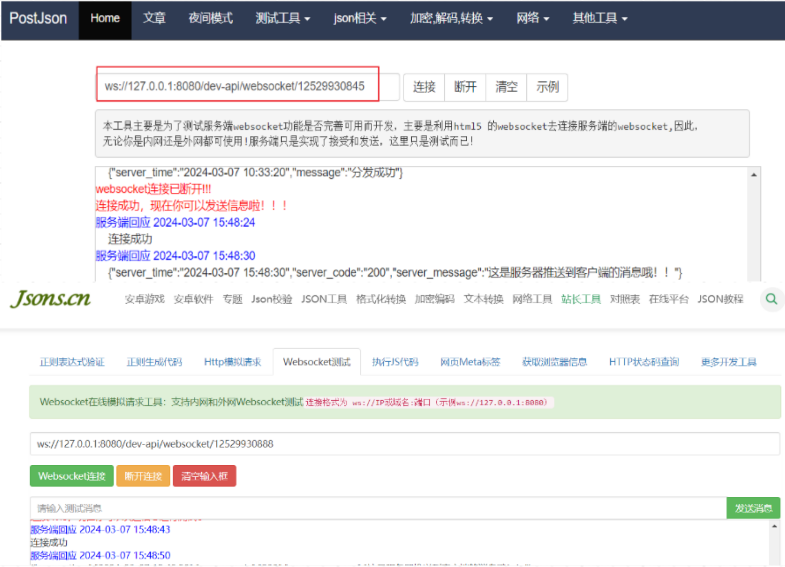
可以使用网上的测试工具试试:http://coolaf.com/tool/chattest 或者http://www.jsons.cn/websocket/
前端代码(vue3+WebSocket) 简单的WebSocket公共类 需求:commentUtil/WebsocketTool.js
1 2 3 4 5 6 7 8 9 10 11 12 13 14 15 16 17 18 19 20 21 22 23 24 25 26 27 28 29 30 31 32 33 34 35 36 37 38 39 40 41 42 43 44 45 46 47 48 49 50 51 52 53 54 55 56 57 58 59 60 61 62 63 64 65 66 67 68 69 70 71 72 73 74 75 76 77 78 79 80 81 82 83 84 85 86 87 88 89 90 91 92 93 94 95 96 97 98 99 100 101 102 class WebSocketReconnect { constructor (url, maxReconnectAttempts = 3 , reconnectInterval = 20000 , maxReconnectTime = 180000 ) { this .url = url this .maxReconnectAttempts = maxReconnectAttempts this .reconnectInterval = reconnectInterval this .maxReconnectTime = maxReconnectTime this .reconnectCount = 0 this .reconnectTimeout = null this .startTime = null this .socket = null this .connect () } connect ( console .log ('connecting...' ) this .socket = new WebSocket (this .url ) this .socket .onopen = () => { console .log ('WebSocket Connection Opened!' ) this .clearReconnectTimeout () this .reconnectCount = 0 } this .socket .onclose = (event ) => { console .log ('WebSocket Connection Closed:' , event) this .handleClose () } this .socket .onerror = (error ) => { console .error ('WebSocket Connection Error:' , error) this .handleClose () } } handleClose ( if (this .reconnectCount < this .maxReconnectAttempts && (this .startTime === null || Date .now () - this .startTime < this .maxReconnectTime )) { this .reconnectCount ++ console .log ('正在尝试重连 (${this.reconnectCount}/${this.maxReconnectAttempts})次...' ) this .reconnectTimeout = setTimeout (() => { this .connect () }, this .reconnectInterval ) if (this .startTime === null ) { this .startTime = Date .now () } } else { console .log ('超过最大重连次数或重连时间超时,已放弃连接!Max reconnect attempts reached or exceeded max reconnect time. Giving up.' ) this .reconnectCount = 0 this .startTime = null } } clearReconnectTimeout ( if (this .reconnectTimeout ) { clearTimeout (this .reconnectTimeout ) this .reconnectTimeout = null } } close ( if (this .socket && this .socket .readyState === WebSocket .OPEN ) { this .socket .close () } this .clearReconnectTimeout () this .reconnectCount = 0 this .startTime = null } } export default WebSocketReconnect
在任意Vue页面
1 2 3 4 5 6 7 8 9 10 11 12 13 14 15 16 17 18 19 20 21 22 23 24 25 26 27 28 29 30 31 32 33 34 35 36 37 38 39 40 41 42 43 44 45 <template> <div> <el-input v-model="textarea1" :rows="5" type="textarea" placeholder="请输入" /> </div> </template> <script setup> import { ref, reactive, onMounted, onUnmounted } from 'vue' import WebSocketReconnect from '@/commentUtil/WebsocketTool' // -------------------------------------------- let textarea1 = ref('【消息】---->') let websocket = null // 判断当前浏览器是否支持WebSocket if ('WebSocket' in window) { // 连接WebSocket节点 websocket = new WebSocketReconnect('ws://127.0.0.1:8080' + '/dev-api/websocket/1122334455') } else { alert('浏览器不支持webSocket') } // 接收到消息的回调方法 websocket.socket.onmessage = function (event) { let data = event.data console.log('后端传递的数据:' + data) // 将后端传递的数据渲染至页面 textarea1.value = textarea1.value + data + '' + '【消息】---->' } // 监听窗口关闭事件,当窗口关闭时,主动去关闭websocket连接,防止连接还没断开就关闭窗口,server端会抛异常。 window.onbeforeunload = function () { websocket.close() } // 关闭连接 function closeWebSocket() { websocket.close() } // 发送消息 function send() { websocket.socket.send({ kk: 123 }) } // ------------------------------------ </script> <style scoped></style>
效果:
1
2
3
【消息】---->连接成功 【消息】---->{"server_time":"2024-03-07 15:53:40","server code":"200","server_message":"服务器推送客户端的消息!"} 【消息】---->{"server_time":"2024-03-07 15:53:50","server_code":"200","server_message":"服务器推送客户端的消息!"}